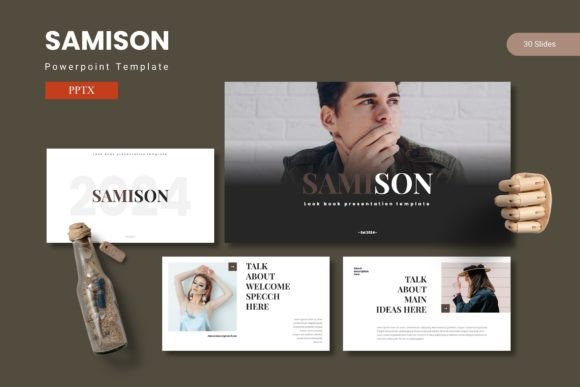
Samison: A Powerful PowerPoint Template for Modern Presentations
Imagine walking into your next big meeting or client pitch with a presentation that doesn’t just share information, but tells a compelling visual story. That’s the promise of the Samison - Powerpoint Template, a comprehensive design toolkit built for professionals who want their ideas to resonate with clarity and impact. It moves beyond basic slides, offering a polished framework to transform complex data and narratives into a cohesive, engaging experience.
This isn't just another slide deck. The Samison template is a versatile design asset crafted for the modern creator. With over 150 slides organized across five distinct color schemes, it provides the flexibility to match any brand identity or project mood instantly. Whether you're preparing a corporate report, a creative portfolio review, or an educational workshop, the foundation is already set for a premium and professional output.
Designed for Clarity and Creative Flexibility
At its core, great presentation design is about communication. The Samison template excels here with features like handcrafted infographics and pixel-perfect illustrations that help translate abstract ideas into understandable visuals. The layouts are built on master slides, ensuring consistency across every page, while the drag-and-drop picture placeholder makes integrating your own imagery effortless. This blend of structure and flexibility is key for maintaining a strong visual narrative without getting bogged down in formatting details.
The practical applications are vast. Consider how this template could streamline your workflow for:
- Brand & Marketing Pitches: Showcase campaign strategies, market research, and brand guidelines with slides that reflect a modern typography sensibility and clean aesthetics.
- Product Launches & Portfolios: Use the dedicated gallery and portfolio slides to create a stunning visual showcase for new products, design work, or project case studies.
- Data-Driven Reports: Present financials, analytics, and project timelines in a clear, visually engaging way that holds audience attention and aids comprehension.
- Educational & Training Materials: Develop workshops, lectures, or training modules that look professional and are easy for participants to follow.
Tips for Making the Most of Your Template
Choosing the right template is just the first step. To truly leverage its potential, keep these practical tips in mind. First, always start by selecting the color scheme that best aligns with your project's tone or your client's brand palette. The five premade options offer a great starting point for font pairing and overall aesthetic.
Next, think about your content hierarchy. Use the section break slides to create natural pauses and organize your presentation into digestible chapters. This improves flow and makes it easier for your audience to follow your argument. Remember, the editable graphics and resizable elements are your tools for customization—don’t be afraid to adjust layouts to best serve your specific content.
Finally, always ensure the license of any design asset fits your intended use, especially for commercial projects. Reviewing the included readme file for font and photo information is a crucial step to avoid issues later. The right template, used thoughtfully, does more than just make slides look good; it enhances your credibility, strengthens your message, and ultimately helps you share your ideas with the confidence they deserve.